Multi-Factor Authentication (Duo) Support
What is Multi-Factor Authentication (MFA)?
Multi-Factor Authentication (MFA) helps protect your account with an added layer of security. Along with your password, you verify your identity with a second method, such as a mobile device, phone call, or passcode. All Faculty, Staff, and students must use DUO MFA to access email, VPN, and other UNT Dallas systems.
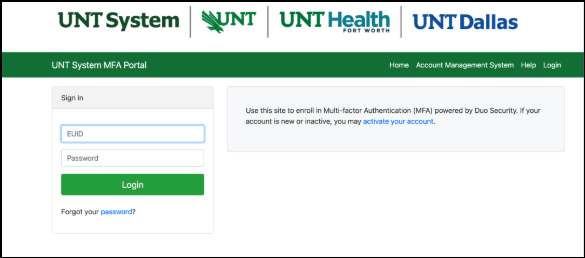
- Go to UNT System MFA Portal
- Login with your EUID and Password.
- Select "Enroll in MFA".
- When prompted, verify your identity by providing your data that matches what is in your UNT record.
- Select "Start Setup".
- Select the type of device you'd like to use. The recommended type is a mobile phone.
- When prompted, enter your mobile number.
- Select your platform (iOS or Android).
- Install the free Duo Mobile app on your device.
- Use the Duo Mobile app on your device and follow the prompt to point your camera at the QR code on the screen.
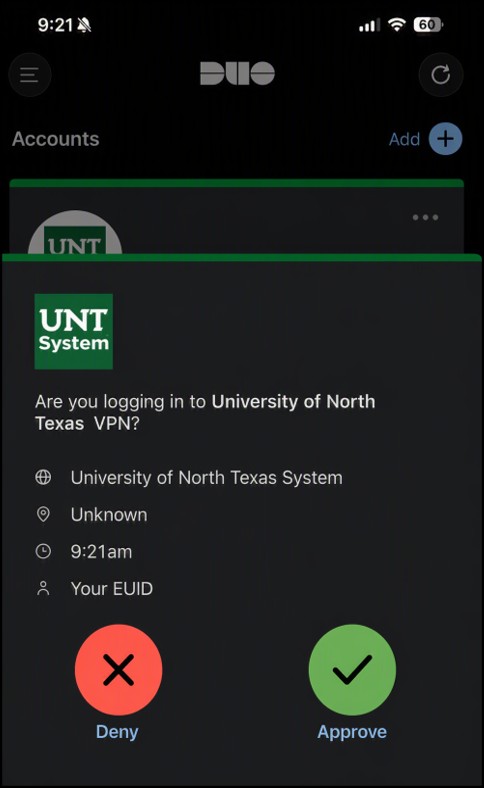
- Log in with your UNT Dallas credentials
- Approve the login using Duo Mobile or another method
- Access your account securely
What if I am unable to log in?
Verify that you are enrolled in Duo and have access to your registered authentication device. If issues persist, contact the Help Desk.
Can I register more than one device?
Yes. We recommend registering a backup device, such as a secondary phone or tablet, to prevent account access issues.
What is the best authentication method to use?
Duo Push through the Duo Mobile app is the recommended option because it is fast,
secure, and easy to use.
What if I forgot my phone at home?
If you have enrolled a backup device, use that option to authenticate. If not, contact
the Help Desk for assistance.
What if I lose my phone or it is stolen?
Contact the Help Desk immediately. A technician can help secure your account and assist
with enrolling a new authentication device.
What should I do if I get a new phone?
Log in to the Duo Device Management portal and add or replace your device. If you
cannot access your account, contact the Help Desk for assistance.